Every document your public can find, accessible, with the proof to show for it
Connect the website. Find every PDF. Fix the file itself, with a validation report on every one. Keep it that way.
The scan and the quote are free. Annual pricing below, sized to buy without a bid.
A real run, state sample, production engine, October 2026.
DOJ interim final rule, April 2026. The standard, WCAG 2.1 Level AA, did not change.
Fix the document people download.
A web view doesn’t change the PDF someone saves, shares or opens later. We repair the structure inside the file, so the work travels with the document.
Title II allows a separate alternate version only where technical or legal limits prevent fixing the original.
Read the DOJ guidanceFrom a website address to an accessible estate
- ConnectA sitemap, a page list, the WordPress or Drupal library, or the API.
- ScanEvery PDF found, counted and checked. New and changed ones re-queued.
- RemediateTagged to PDF/UA-1, OCR included, veraPDF report on every file.
- Publish and keepAccessible HTML beside each PDF, a citizen request form, an audit trail.
Every tool on this page ships today
The engine, the editor and the Monitor. Most vendors sell one. We ship all three, and you can watch each one run.
- Sitemap
- WordPress
- Drupal
- SharePoint beta
- Drive beta
- Push API
- Status
- Document type
- Review flags
- Unreadable lines
- Reviewer
- Reading order
- Headings
- Tables
- Lists
- Links
- Alt text
- Bookmarks
- OCR
- Public view
- Compare view
- Read-back
- WCAG 2.1 AA
- Citizen form
- Priority queue
- Status page
- On the record
- Live page
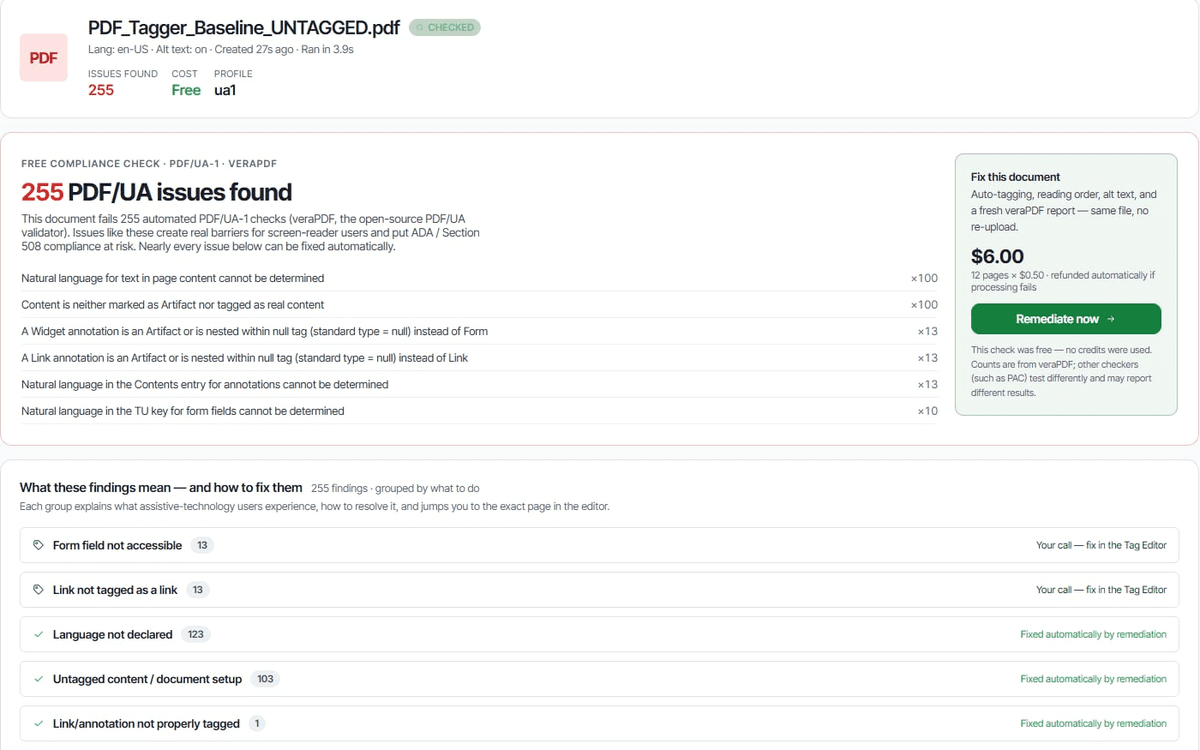
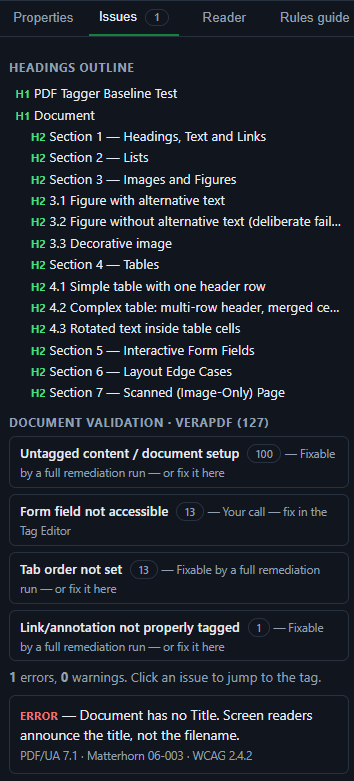
- Real veraPDF results
- Screen-reader preview
- HTML editor
- $6 a page typed
- $10 a page scanned
- NDA
- Report per file
- Activity log CSV
- Retention windows
- US-only processing
The editor in detail: Tag Editor. Measured results: Results.
What the other options actually get you
| Compared on | Remediation shops | Monitoring dashboards | Overlays and widgets | AccessiblePDF |
|---|---|---|---|---|
| Price | $4 to $11.50 a page, after a quote | Per site, thousands; fixing extra | Per site; the PDF untouched | $0.50 a page, or included |
| Turnaround | Weeks | Never. It counts. | Instant, and nothing changes | Minutes, in parallel |
| Evidence | A PDF emailed back | A chart of what is wrong | A badge on the page | A veraPDF report, every file |
| Coverage | What you send | What it finds | The web page only | Every document, kept current |
| Afterwards | A new invoice per revision | Still your problem | Still your problem | Edit it yourself, or a specialist |
Ask any vendor for the veraPDF report on the last file they delivered. Then ask us.
Annual, sized to buy without a bid
One number for a card or a budget line. Pages included, archive priced once, specialists per page.
- 5,000 pages a year
- 3 editor seats
- Sources and the Monitor
- Report with every file
- 25,000 pages a year
- 10 editor seats
- API and push connector
- Review flags
- Pages sized to the archive
- Specialist hours pool
- Priority support
- Security questionnaire answered
Written for the questionnaire
Every claim on the security page is true today. Roadmap items say so.
- US-only processing and storage, encrypted at rest and in transit.
- Row-level security per organization, in the database itself.
- No model training on your documents.
- Retention windows, a tamper-evident activity log, self-service deletion.
Request a scan or a remediation quote
How many documents, how many pages, how many fail, and what a program would cost. Have the files already? Send them straight to remediation.
Questions procurement asks
When do the Title II deadlines apply to our PDFs?
April 26, 2027 for public entities of 50,000 or more residents; April 26, 2028 for smaller entities and special districts (DOJ interim final rule, April 2026). The standard is WCAG 2.1 Level AA, and it covers the PDFs on your website.
Does it cover documents already on our site?
The rule exempts archived content only when it predates the compliance date, is kept for reference, sits in a marked archive and has not changed. A document someone needs or asks for falls back inside the rule. The request form covers that case.
Is an accessible web version enough?
Not on its own. The rule allows a separate alternate version only where technical or legal limits prevent fixing the original. We fix the PDF first and publish the HTML beside it.
What does zero findings mean?
veraPDF found nothing to object to against the PDF/UA-1 profile. The report ships with the file. Where the engine cannot settle a cell or read a line, it flags that for a person rather than guessing.
How fast can an archive be done?
Documents run in parallel. A 55-document, 374-page sample finished in about fifteen minutes; a 128-page scan took eighteen on its own.
How do we buy it?
Annual tiers sized under common small-purchase thresholds, on a card or a single quote. Two-year programs on one contract. Invoicing, a W-9 and security documentation on request.
What about documents the engine cannot fix?
The Monitor shows which ones. Finish them in the Tag Editor, send them to a specialist per page, or let a citizen's request move one to the front.